How to get your reporters started with vertical video

Muhammad Osama Farooq is a 2026 RJI Student Innovation Fellow partnered with Detroit Free Press. The RJI Student Fellows will be sharing their innovative work throughout the summer in Innovation in Focus.
Many newsrooms want to create better vertical videos because they know that their audiences are scrolling on Instagram Reels, TikTok, and YouTube Shorts. But not every newsroom has expansive resources, like production teams or dedicated videographers. If they want to capture video in the field, often reporters have to do it themselves.
Shifting from a word driven to a video-first mindset can feel like an entirely separate, overwhelming challenge. At the Detroit Free Press, we have started working to make producing vertical video more accessible for our reporters. We are trying to find ways to make video a natural, simple part of the reporting routine that journalists already do every day.
By building a structured, highly visual blueprint, we are building a workflow to help any reporter capture high-engagement vertical news packages using nothing more than the smartphone in their pocket.
All reporters are not videographers
In any newsroom, there is a wide range of talents; some reporters are naturally more visually or technically savvy, while others are highly skilled at investigative techniques or data collection.
Those who are newer to the video format can feel overwhelmed when trying to capture footage in the field. That is why we are focusing on a simple system that respects their limited time and diverse skill sets.
By simplifying the process and removing the fear of video production, this system will also work in favor of a higher turnover for videos across the newsroom. When creating content becomes faster and less stressful, the newsroom can naturally produce and publish high-quality video packages much more frequently.
To make this easy, we are working on how to match their story assignment to the correct template.
For example:
- The reporter review template: If the story is about a specific place with a clear, central news topic (for example, a restaurant facing a massive rent hike or a supply chain issue).
- The community voice template: If the story centers on a neighborhood issue where everyday residents are split, impacted, or divided (like a new bike lane or a closing of a community park).
- The personal feature template: If the story focuses on a personal journey, an inspiring story of overcoming odds, or a long-time local adapting to a changing city.
Thinking about video from the very start
Before reporters head out on assignment, it can be beneficial to storyboard the structure of the video so they know what they need to record. They can plan what the intro will look like, what the outro will say, and what core piece of information they want the audience to walk away with and brainstorm ideas for b-roll and visuals they may capture.
Reporters can ask themselves three quick questions before they head out:
- What does this location actually look like, and what is its visual center?
- How will I hook the audience in the intro, and how will I wrap it up in the outro?
- What is the single most important fact I want the viewer to know?
By visualizing these details early and making a plan, filming can become a natural part of the regular reporting routine instead of an extra task they may forget to do. The reporter enters the scene with a clear checklist and plan for their video. They know exactly who to talk to, what background images to capture, and how to control the pacing of the story from start to finish.
Using your smartphone to its fullest capacity
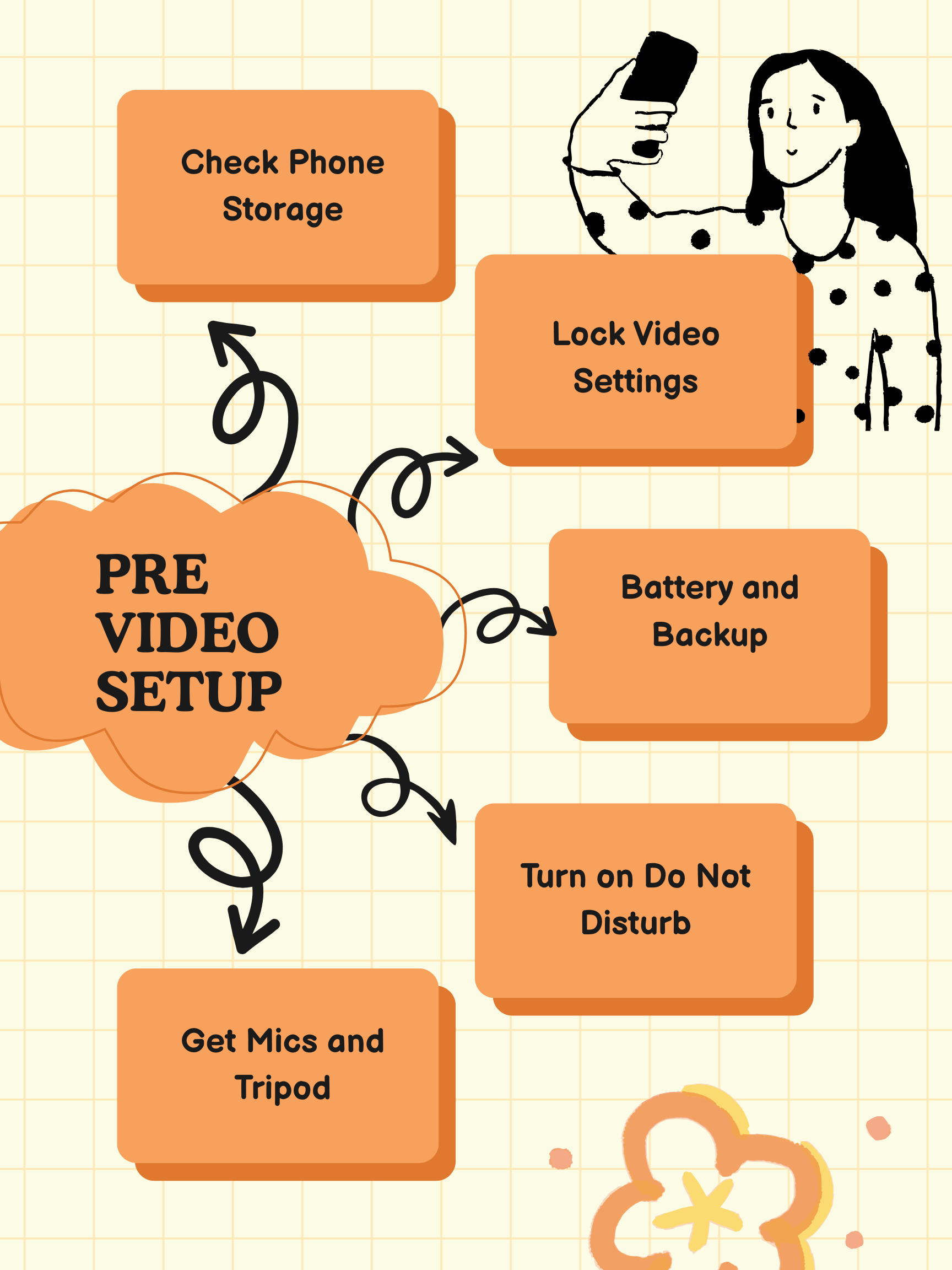
We are training our reporters on a few basic technical rules to maximize their video quality:
- Turn HDR off: High Dynamic Range (HDR) looks good on a personal screen, but it breaks and discolors the footage when you import it into newsroom editing software. We teach reporters to turn this off immediately and stick to standard 1080p at 30fps.
- The upper-half framing rule: Instead of teaching complicated cinematography math, we divide the vertical screen into a top half and a bottom half. A person’s face and eyes must always stay in the upper half of the screen. This prevents massive, empty dead space above their head, and it leaves just enough room for newsroom headline graphics without covering their eyes.
- Do Not Disturb mode: A simple text message or phone call will instantly freeze or stop a video recording mid-shoot. Turning on “Do Not Disturb” must become an automatic muscle-memory action before hitting the record button.
What actually counts as a hook and a b-roll?
To make these templates work, reporters must understand the difference between the two core elements of vertical video: the Hook and the B-Roll.
The hook (0–5 seconds)
The hook is the beginning of your video, and its only job is to stop the viewer’s thumb from scrolling away. Watch for an authentic, high-motion, or real-world moment happening live when you’re in the field. It could be a hot grill sizzling with flames, a dramatic customer reaction to a first bite, or even a funny, clumsy mistake made by the reporter. Spot it live, capture it, and place it at the very beginning of your video with an intro that captures the viewers attention and tells them what they’re going to learn more about in your video.
The b-roll
B-roll is the visuals that tells the story visually to deepen the understanding and engagement of a narrative. It is not just random background footage of walls or streets, or step by step recording of motions of your topic. If the reporter states a hard fact or a finding in the audio, the video should show that statement visually as well. If you say prices went up, show the scribbled-over menu board. If you say a business is short-staffed, show a visual of one lone worker running three stations. Telling the story visually will keep people engaged, enhance emotional investment into the topic and help people understand what you’re telling them.
Interviewing for video
When it comes to vertical video the answers need to be short and crisp. You may only use one or two quotes, and often they’re the most important or emotionally charged moments of a longer interview.
A great time-saving strategy is to conduct your traditional interview normally. As you listen to your source, you can make a quick mental or physical note whenever they hit a highly interesting, emotional, or core point that would fit perfectly into a vertical video. Once the written interview is done, you can ask them to step in front of the camera for just a moment to highlight a specific point or anecdote. You can then rephrase your question to get a fresh, focused version of their quote. This simple adjustment saves massive time and effort in the field and in the editing room, giving you a clean, high-impact audio clip ready for immediate use.
How to keep the audience watching and commenting
Digital engagement relies heavily on algorithms and the inherent language of vertical spaces, so we built three strict engagement rules directly into our templates to encourage engagement:
- The 3–5 second visual change: Mobile audiences have incredibly short attention spans. If nothing changes visually on the screen every 3 seconds — whether it is a quick cut to a new clip or a text graphic popping up — the viewer may get bored and swipe away.
- The “comment below” prompt: Traditional media tells viewers to “visit our website to read more.” We use the final 10 seconds of the video to ask a direct question to the community. Prompting viewers to debate, share their experiences, or tag another local spot they want us to cover helps the platform’s algorithm to share our journalism out to more local feeds.
- The silent viewers rule: Over half of our mobile audience watches video with the sound completely turned off. If we do not include bold, clear, and easy-to-read text graphics on the top half of the screen summarizing what we’re sharing, we lose those viewers instantly.
Next steps: Replicating the system
Right now, we are still in the development phase, working hard to build and refine the structures of our vertical video playbook.
In the coming weeks, we are going to work one-on-one with different reporters to understand their current comfort levels with mobile video, as well as the unique day-to-day challenges they face on their beats. This will involve a continuous back-and-forth process: we are pitching a template layout, seeing how it aligns with a reporter’s real-world workflow, listening to their feedback, and tweaking the design accordingly.
This collaborative process will build finalized templates multiple time tested for the entire newsroom to use.
By creating a simple, repeatable, and non-technical system, we are lowering the barrier to entry for vertical video. We hope that local newsrooms across the country can use our playbook and begin reaching these audiences directly on the platforms where they spend their time.
Cite this article
Farooq, Muhammad Osama (2026, June 25). How to get your reporters started with vertical video. Reynolds Journalism Institute. Retrieved from: https://rjionline.org/news/how-to-get-your-reporters-started-with-vertical-video/